Websites that get trades businesses the call.

Five trades, five different websites. Each one is built around how that trade’s customers actually hire: the urgent call, the comparison, the booking, the ‘not yet’.

  1. Two Springs Garage Door Co. on a phone, first screen

    Two Springs

    Garage door · Corona

    View site: Two Springs Garage Door Co.
  2. Aldana Hart Builders on a phone, first screen

    Aldana Hart

    Home builder · Temecula

    View site: Aldana Hart Builders
  3. Arrieta & Daughters Painting Co. on a phone, first screen

    Arrieta & Daughters

    Painter · Orange

    View site: Arrieta & Daughters Painting Co.
  4. Loam & Line Landscape Co. on a phone, first screen

    Loam & Line

    Landscaper · Thousand Oaks

    View site: Loam & Line Landscape Co.
  5. Deep Shade Air Co. on a phone, first screen

    Deep Shade Air

    HVAC · Palm Desert

    View site: Deep Shade Air Co.

Five trades. Five live websites.

Every one is a working website for a fictional trades business, recorded scrolling on a laptop and a phone. Open them, tap around, try the tools.

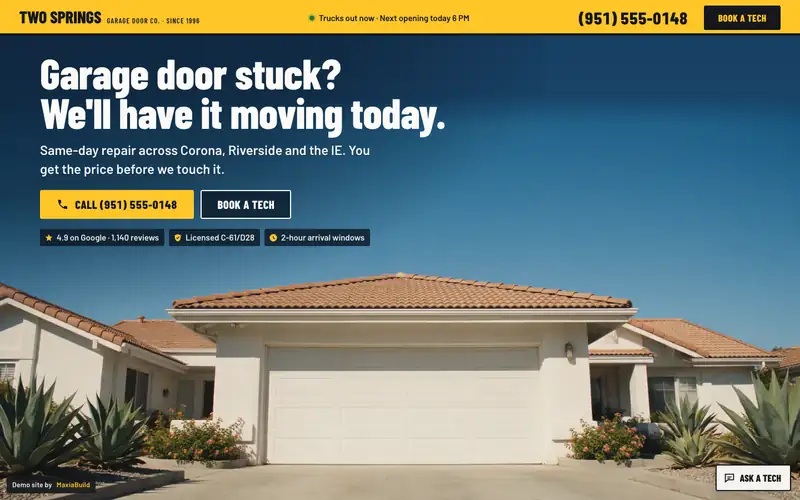
Two Springs Garage Door Co. website, first screen on a desktop browser
Two Springs Garage Door Co. on a phone, first screen

Garage door repair · Corona, CA

Two Springs Garage Door Co.

Twelve short, punchy sections that snap from one to the next. A house with its garage door closed. Scroll and the door rolls up to show a tech already at work inside.

Signature tool: The diagnostic door. Tap one of six symptoms. The door in the drawing does exactly that, the failed part lights up, and a work ticket prints the likely cause, a price range and the next opening. "Book this repair" opens booking with the symptom already filled in.

  • It's broken now: Call · Text · Book a tech
  • Still comparing: The diagnostic door
  • Ready to book: Book a tech
  • Not yet: Remind me

Lighthouse mobile: Performance 96–97 · Accessibility 100. From our own tests on Two Springs Garage Door Co.
Aldana Hart Builders website, first screen on a desktop browser
Aldana Hart Builders on a phone, first screen

Custom home builder · Temecula, CA

Aldana Hart Builders

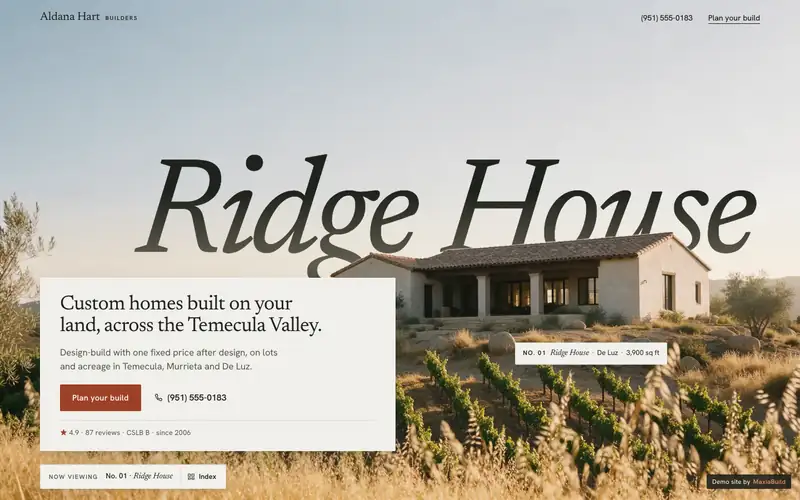
Eight slower rooms. A layered photo of a finished home on a ridge, its name set in the sky and sinking behind the roofline.

Signature tool: Staking the lot. Drag a house footprint anywhere on a hillside parcel and pick a size and finish. Grading, retaining walls, septic, fire code and months update for that spot, and the result carries into "Plan your build".

  • It's broken now: Call · Text · Plan your build
  • Still comparing: Staking the lot
  • Ready to book: Plan your build
  • Not yet: RSVP

Lighthouse mobile: Performance 97 · Accessibility 100. From our own tests on Aldana Hart Builders

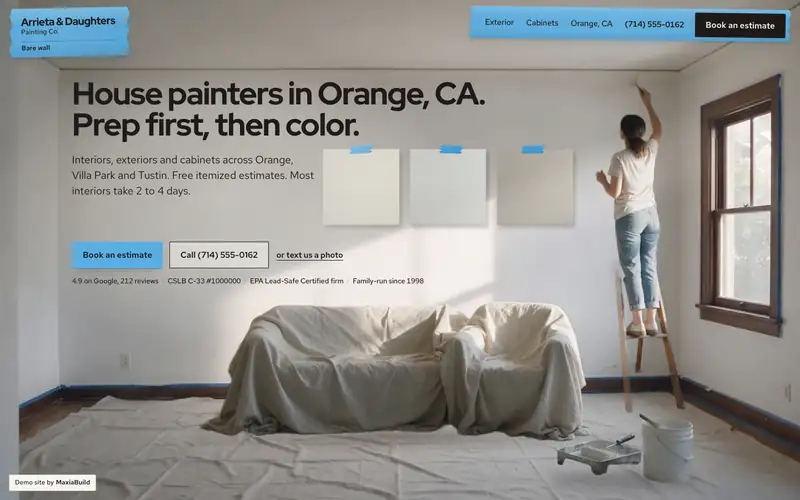
Arrieta & Daughters Painting Co. website, first screen on a desktop browser
Arrieta & Daughters Painting Co. on a phone, first screen

House painter · Orange, CA

Arrieta & Daughters Painting Co.

Nine coats of paint. A primed living room mid-job, a painter on a ladder and three sample boards on the wall. The first coat is masking film that slides up over it.

Signature tool: The light test. Three sample boards in real Dunn-Edwards, Benjamin Moore and Sherwin-Williams colors on a real room's wall. Scroll runs an October day in a west-facing room; then you drag the sun, turn the window and pick bulbs, and each board says what it now reads as. At 5:30 PM Swiss Coffee turns creamy yellow while Chantilly Lace stays white. "Book a color visit" carries your three colors into the form.

  • It's broken now: Call · Text · Book
  • Still comparing: The light test
  • Ready to book: Book an estimate
  • Not yet: RSVP

Lighthouse mobile: Performance 96–99 · Accessibility 100. From our own tests on Arrieta & Daughters Painting Co.

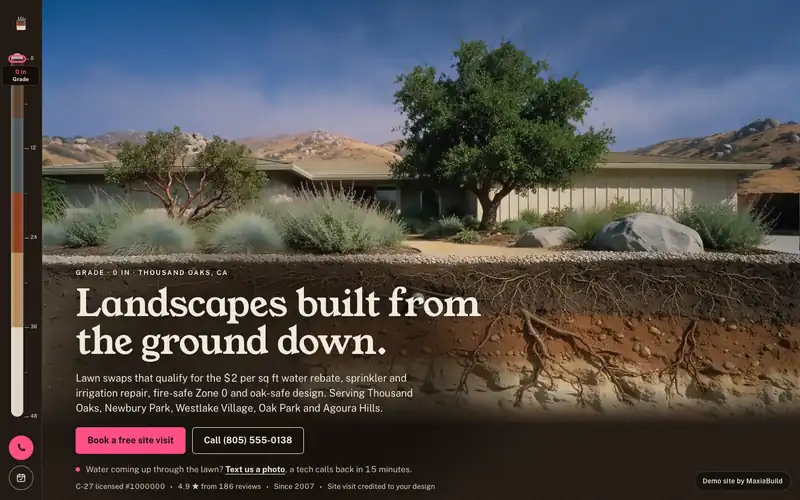
Loam & Line Landscape Co. website, first screen on a desktop browser
Loam & Line Landscape Co. on a phone, first screen

Landscaper · Thousand Oaks, CA

Loam & Line Landscape Co.

One dig straight down through a yard. A finished garden photographed as a cutaway, with the soil, roots and irrigation pipe under it. The headline sits in the dirt, and scrolling lowers the camera below ground as the soil face rises over the garden.

Signature tool: The meter. A water-meter register and a reservoir staff gauge over a real lawn. Scroll runs one July week. Then you hold the valve: the sprinklers come on and blue water rises up the screen, month by month on Thousand Oaks' real weather and water-loss, past a backyard pool to the year mark. Release, and a card gives your lawn's gallons and cost at your water company's rate, the $2 per sq ft rebate, the water a swap saves and the project range. "Plan my lawn swap" carries the lawn size and rebate into the booking.

  • It's broken now: Call · Text · Book
  • Still comparing: The meter
  • Ready to book: Book a free site visit
  • Not yet: RSVP

Lighthouse mobile: Performance 97–99 · Accessibility 100. From our own tests on Loam & Line Landscape Co.

Deep Shade Air Co. website, first screen on a desktop browser
Deep Shade Air Co. on a phone, first screen

HVAC · Palm Desert, CA

Deep Shade Air Co.

One technician's route across the Coachella Valley on a 116-degree afternoon. The company's service van speeds onto a Palm Desert street, brakes hard and settles at the curb of a white mid-century house with its AC condenser in view. The offer, service area, phone number and booking button sit in the pale sky above.

Signature tool: The thermal camera. A thermal-camera lens over a real room photo. Wherever you point it, the room turns infrared and reads the temperature under the crosshair from a real heat map. Six hot spots log as findings, from a 79-degree supply register that should blow 58 to can lights at 122, each with the cause, the fix and the price. Scrolling sweeps the lens for you, and "Scan the whole room" shows everything. The findings carry into a comfort-audit booking.

  • It's broken now: Call · Text · Book
  • Still comparing: The thermal camera
  • Ready to book: Book today's visit
  • Not yet: RSVP

Lighthouse mobile: Performance 98–99 · Accessibility 100. From our own tests on Deep Shade Air Co.

How customers reach you

Every visitor is somewhere different: something broke, they're comparing, they're ready, or they're not yet. Pick a moment to see the exact button each site puts in front of them, outlined where it sits on the live page.

Two SpringsGarage door

Two Springs Garage Door Co. on a phone, first screen as a visitor lands
Two Springs Garage Door Co. on a phone at the "It's broken now" moment, with "Call · Text · Book a tech" outlined
Two Springs Garage Door Co. on a phone at the "Still comparing" moment, with "The diagnostic door" outlined
Two Springs Garage Door Co. on a phone at the "Ready to book" moment, with "Book a tech" outlined
Two Springs Garage Door Co. on a phone at the "Not yet" moment, with "Remind me" outlined

“Call (951) 555-0148”

Offer, service area, phone and "Book a tech" are all on the first screen.

“Call · Text · Book a tech”

After the hero, a dock keeps those three at the bottom of the phone. One tap calls.

“The diagnostic door”

Tap a symptom, see what broke and what it usually costs, then "Book this repair".

“Book a tech”

Four steps: the problem, a time window, the address, a mobile number to text.

“Remind me”

One phone field. They text before tune-up season.

Aldana HartHome builder

Aldana Hart Builders on a phone, first screen as a visitor lands
Aldana Hart Builders on a phone at the "It's broken now" moment, with "Call · Text · Plan your build" outlined
Aldana Hart Builders on a phone at the "Still comparing" moment, with "Staking the lot" outlined
Aldana Hart Builders on a phone at the "Ready to book" moment, with "Plan your build" outlined
Aldana Hart Builders on a phone at the "Not yet" moment, with "RSVP" outlined

“Plan your build”

The first screen is the offer on a label card, the phone number and one button.

“Call · Text · Plan your build”

Builders are rarely urgent, so the phone stays quiet: a bar after the hero with Call and Text.

“Staking the lot”

Move the house around the lot and watch site costs and months change before anyone calls.

“Plan your build”

Four questions (land, size, timing, contact) and the frame's label fills in as they answer.

“RSVP”

Open houses and a lot-walk clinic, each with a two-tap RSVP: party size, then name and mobile.

Arrieta & DaughtersPainter

Arrieta & Daughters Painting Co. on a phone, first screen as a visitor lands
Arrieta & Daughters Painting Co. on a phone at the "It's broken now" moment, with "Call · Text · Book" outlined
Arrieta & Daughters Painting Co. on a phone at the "Still comparing" moment, with "The light test" outlined
Arrieta & Daughters Painting Co. on a phone at the "Ready to book" moment, with "Book an estimate" outlined
Arrieta & Daughters Painting Co. on a phone at the "Not yet" moment, with "RSVP" outlined

“Book an estimate”

Offer, service area, phone and "Book an estimate" are all on the first screen, set on the room's empty wall.

“Call · Text · Book”

After the hero, a strip of tape keeps Call, Text and Book at the bottom of the phone. A rush line promises two rush starts a week for listings and HOA deadlines.

“The light test”

Move the sun across a real room and see how three whites change by the hour, then book a color visit with those three colors.

“Book an estimate”

Four steps: what we're painting, in-home or video with a time slot, the ZIP and whether it's pre-1978, then a mobile to text.

“RSVP”

Color nights at the studio shown as paint chips, each with a two-tap RSVP, plus a text reminder when spring exterior dates open.

Loam & LineLandscaper

Loam & Line Landscape Co. on a phone, first screen as a visitor lands
Loam & Line Landscape Co. on a phone at the "It's broken now" moment, with "Call · Text · Book" outlined
Loam & Line Landscape Co. on a phone at the "Still comparing" moment, with "The meter" outlined
Loam & Line Landscape Co. on a phone at the "Ready to book" moment, with "Book a free site visit" outlined
Loam & Line Landscape Co. on a phone at the "Not yet" moment, with "RSVP" outlined

“Book a free site visit”

Offer, service area, phone and "Book a free site visit" all sit in the soil under the garden on the first screen.

“Call · Text · Book”

After the hero, a Call · Text · Book bar stays at the bottom of the phone. In the irrigation layer: three steps for a broken line, a big phone number, text-a-photo and today's repair windows.

“The meter”

Hold the valve to watch a year of your lawn's water fill the screen, then see your bill, the rebate and a swap price, and plan it.

“Book a free site visit”

Four steps: the project, an on-site or video slot, the ZIP and HOA, then a mobile to text. Tools on the page pre-fill it.

“RSVP”

A drawn map of the Conejo Valley with three events (a lawn-swap garden walk, a rebate clinic, a Zone 0 walk-through), each with a two-tap RSVP. Also a text reminder before brush-clearance season.

Deep Shade AirHVAC

Deep Shade Air Co. on a phone, first screen as a visitor lands
Deep Shade Air Co. on a phone at the "It's broken now" moment, with "Call · Text · Book" outlined
Deep Shade Air Co. on a phone at the "Still comparing" moment, with "The thermal camera" outlined
Deep Shade Air Co. on a phone at the "Ready to book" moment, with "Book today's visit" outlined
Deep Shade Air Co. on a phone at the "Not yet" moment, with "RSVP" outlined

“Book today's visit”

Offer, service area, phone and "Book today's visit" sit in the sky above the arriving van on the first screen.

“Call · Text · Book”

After the hero, a Call · Text · Book bar stays at the bottom of the phone. The first stop has today's open windows, a big call button and "text a photo of your unit".

“The thermal camera”

Point a thermal camera at a bedroom that won't cool and find where the heat gets in, with the fix and price for each spot, then book a comfort audit with the findings.

“Book today's visit”

Four taps in a text thread with dispatch: what's going on, a window today or tomorrow, the ZIP, then a mobile to text. Tools on the page pre-fill it.

“RSVP”

The fall events drawn as a thermostat's program: a heat pump and rebate night, a snowbird start-up clinic, a casita mini-split workshop and a filter swap morning, each with a two-tap RSVP. Also a text reminder before you're back for the season.

Every site ships with the same six things.

The look changes with every trade. What's underneath doesn't.

  • Motion that makes people stop scrolling

    On Two Springs the garage door rolls up to show a tech at work. On Arrieta & Daughters each section rolls up over the last like a fresh coat of paint.

  • A way in for every kind of visitor

    Someone with an emergency, someone comparing, someone ready to book and someone not ready yet each get their own button.

  • Search-ready from day one

    Service pages and city pages, structured data for the business, and an FAQ written in the words customers actually use. Aldana Hart adds a guide to what it costs to build.

  • Built to convert

    The first screen sells: the offer, the area, the phone number and one button. Forms start with an easy tap and ask for contact details last. The tools on the page fill the booking form in for them.

  • Fast on a phone

    Every site is tested with Lighthouse on a simulated phone before launch. The live demos score 96 to 99 on performance in our own tests.

  • Events built in, with Maxia Pulse

    List an open house, a color night or a rebate clinic, take the RSVP in two taps and send the reminder.

Maxia Pulse: events

Events turn ‘not yet’ into a date

Plenty of people who aren't ready to hire will still come to something. An event gives them a reason to show up now, and it gives you their name and number.

The site lists the event, takes the RSVP in two taps and sends the reminder. Every RSVP is a lead you can follow up.

Four of the five demo sites already run events

  • Aldana Hart BuildersHome builder · Temecula

    An "On view" list of four events (a model home open house, a design center evening, a twilight tour, a lot-walk clinic), each with a two-tap RSVP.

    Try it on Aldana Hart (opens in a new tab)

  • Arrieta & Daughters Painting Co.Painter · Orange

    Color nights at the studio shown as paint chips, each with a two-tap RSVP, plus a text reminder when spring exterior dates open.

    Try it on Arrieta & Daughters (opens in a new tab)

  • Loam & Line Landscape Co.Landscaper · Thousand Oaks

    A drawn map of the Conejo Valley with three events (a lawn-swap garden walk, a rebate clinic, a Zone 0 walk-through), each with a two-tap RSVP. Also a text reminder before brush-clearance season.

    Try it on Loam & Line (opens in a new tab)

  • Deep Shade Air Co.HVAC · Palm Desert

    The fall events drawn as a thermostat's program: a heat pump and rebate night, a snowbird start-up clinic, a casita mini-split workshop and a filter swap morning, each with a two-tap RSVP. Also a text reminder before you're back for the season.

    Try it on Deep Shade Air (opens in a new tab)

Aldana Hart Builders on a phone at the "Not yet" moment, with "RSVP" outlined

“RSVP” on Aldana Hart Builders, outlined where it sits on the live page.

Questions

Plain answers. If yours isn't here, call or email and a person answers.

(555) 555-0100hello@maxiabuild.com

What is the Modern Trades collection?

Five demo websites, one per trade: garage door repair, custom home builder, house painter, landscaper and HVAC. Each one is a complete, working site for a fictional business, built to show how a site for that trade turns visitors into calls, bookings and RSVPs. All five are live: open any of them and try the tools.

Are these real businesses?

No. The businesses, people and phone numbers are fictional. The sites are real and working: the pages, the tools and the forms all run. Every demo is marked noindex, so it never competes in search with a real company.

Why doesn't every site look the same?

Because the customers are in different situations. Someone with a broken garage door needs a truck today; someone building a custom home is planning a year of their life. Each site is designed around how that trade gets hired: its own first screen, its own tool for customers and its own way to end. What they share is the standard underneath: fast pages, search basics and a way in for every kind of visitor.

What does "search-optimized from day one" mean here?

The site launches with real pages a search engine can read: a homepage, service pages and city pages, each with its own title and description. It carries structured data for the business and its services, an FAQ written as the questions customers actually ask, and it gets a Lighthouse test before it goes live. The demos are noindexed on purpose. Your site would not be.

What is Maxia Pulse?

Event management built into your site: event listings, RSVPs and reminders, so people who aren't ready to hire yet still have a date to come to. [Pulse details to come]

What happens after I fill out a form?

We read it and get back to you, by text if you asked for that. Our reply time: [response time].

How much does a site cost?

[Pricing to come]

How long does it take?

[Typical timeline to come]

Your trade is next.

Three ways in. Pick the one that fits where you are, and it opens right here.

Step 1 of 4What's your trade?
Step 2 of 4Which site should yours feel like?
Step 3 of 4Your business
Step 4 of 4Where do we reach you?

Step 1 of 3What do you want to talk about?
Step 2 of 3When is a good time?
Step 3 of 3Where do we reach you?

Step 1 of 2Which site should we look at?

Your trade

Step 2 of 2Where should we send it?

A phone number or an email. One is enough.